
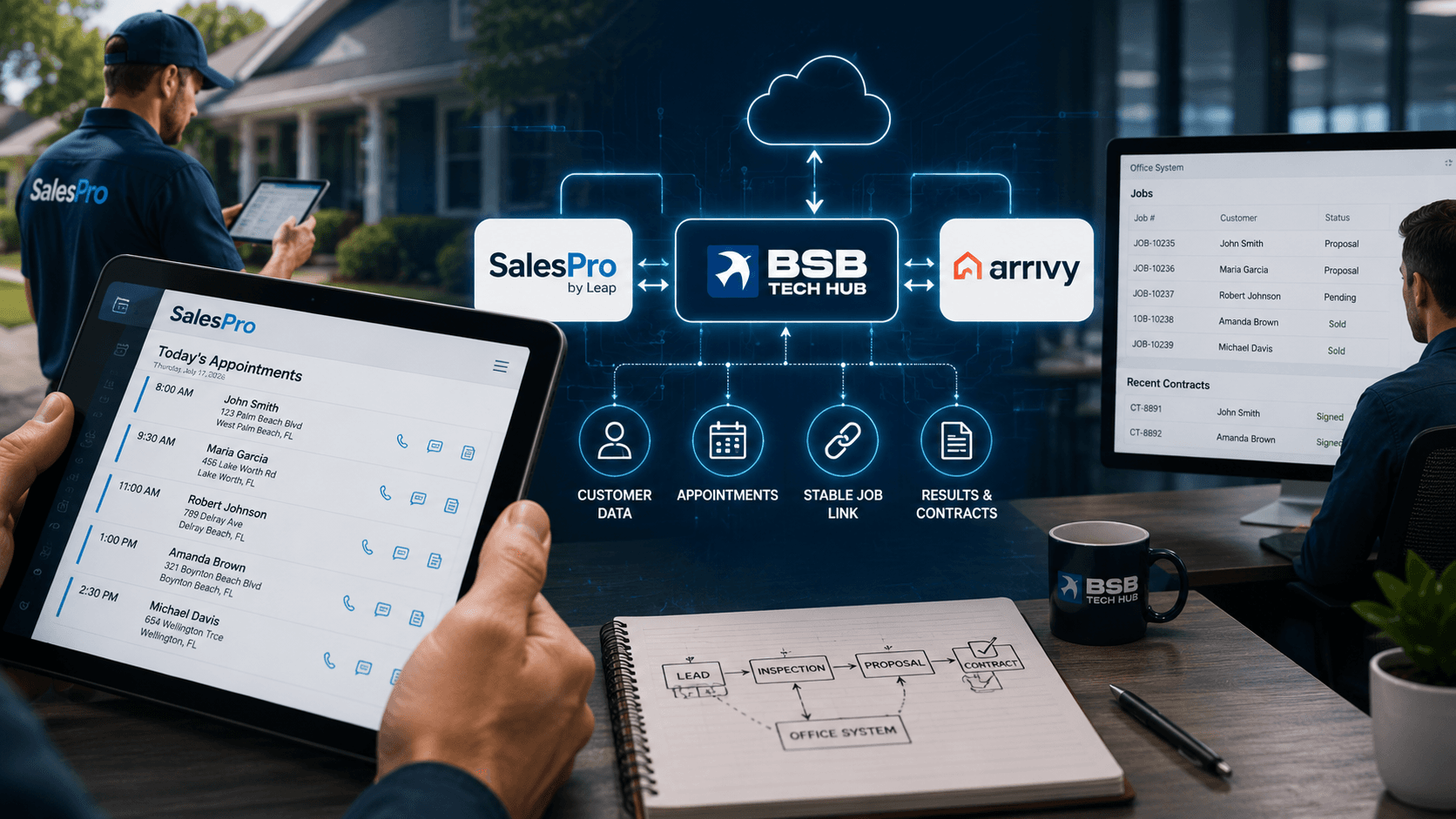
SalesPro–Arrivy Integration
Auto-Loading Field Appointments into the Reps' Proposal Tool
Context
A home-services and exterior remodeling contractor runs in-home inspections where sales reps build proposals on iPads using SalesPro (by Leap), a mobile proposal tool.
SalesPro is a "fetch-and-enrich" app: it pulls a rep's appointments and customer details from an outside system and has no way to create customers on its own. It was designed to discover each rep's daily inspections from the company's CRM, with the customer already filled in.
Then that outside connection disappeared.
The Challenge
When the contractor moved off Salesforce, the automatic link that loaded each rep's appointments — with the customer already populated — broke.
The result:
- “Today’s appointments” showed up empty
- Reps re-typed every customer’s name, address, and contact by hand — slow and error-prone
- Manually-added customers weren’t linked, so a signed contract couldn’t be matched back to the job
- The tool’s “must record an outcome” discipline only works with auto-loaded appointments — so that accountability was lost too
The Solution
We designed and built a dedicated, isolated cloud service that sits between SalesPro and the contractor's operational systems — their scheduling platform (Arrivy) and their office system of record (Airtable).
When a rep opens their calendar in SalesPro, the tool calls our service, and we return that rep's real inspection appointments — each enriched with the customer's details and tagged with a stable reference ID. It is the kind of system integration work that quietly reconnects tools that were never built to talk to each other.
How It Works
- A rep opens the calendar view in SalesPro on the iPad.
- SalesPro securely calls our service with the rep's identity and a date range.
- We identify the rep in the scheduling system and pull only their appointments — filtered to genuine inspection and consultation visits, in the correct dates and time zone.
- Each appointment is matched to its office record, and we attach that record's ID as a durable correlation key.
- SalesPro shows the appointments with the customer already filled in — no manual entry. Because each carries that stable ID, a later contract or result can be tied straight back to the right job.
Key Outcomes
- Daily inspections load automatically on the iPad
- Customer name, address, and contact filled in — no manual typing
- Every appointment linked back to the office record
- Sale results can be matched to the right job automatically
- The “must-result” discipline is restored
- Reps spend more time selling, less on data entry
- Time-zone-correct scheduling across offices
- A reliable foundation for full two-way sync
Engineering Notes
The service was built as an isolated function so it can't affect the client's other automations, with a pluggable data source so the same endpoint can be backed by either the scheduling platform or the system of record.
It handles time zones carefully so a rep's day always aligns with office-local time (including daylight saving), and uses a reverse-lookup technique to bridge two systems that didn't share a common ID out of the box. It runs on Firebase Cloud Functions with secrets managed in Google Secret Manager.
Business Impact
Reps open SalesPro and their inspections auto-load with the customer filled in — the manual re-entry is gone, and with it a whole class of copy-and-paste errors. This is reliable process automation restored to a team that had lost it.
Because every appointment now carries a stable link back to the office record, sale results and contracts can be correlated automatically. The appointment sync is live in production; a second phase to capture sale results back into the office system is designed and next on the roadmap.
Reconnecting Tools That Weren't Built to Talk
This project shows how a focused integration can restore an automatic flow between platforms that have no native connection — removing manual work, preventing errors, and keeping every job traceable from the field back to the office.
Systems Involved
SalesPro (Leap)
Arrivy
Airtable
Firebase Cloud Functions
Google Cloud
Webhooks & REST APIs
Need Two Tools to Work as One?
If your systems don't talk to each other and your team is filling the gap by hand, we can design and build the integration that connects them.